Overview
This page lists new features and bug fixes released to the Code42 cloud in 2022. Click a month below to expand or collapse the details.
For the most recent updates, see Code42 cloud release notes.
December 2022
Features
Agent registration issues
December 21, 2022
A new Agent registration issues screen is available in the Code42 console for identifying and troubleshooting insider risk agents that have failed to successfully register. File activity cannot be collected if an agent is not successfully registered with Incydr, so use Agent registration issues to resolve problems with agent registration and resume data collection.
Risk indicators for all watchlists
December 19, 2022
All default watchlists now have corresponding user risk indicators with customizable risk scores. Previously, the Departing watchlist was the only watchlist to apply a risk indicator.
Files acquired from trusted locations now receive risk scores when sent to untrusted locations
December 5, 2022
Items on your list of Trusted activity now default to being identified as sources likely to contain company data. As a result, files acquired from these locations and later sent to untrusted destinations have source risk indicators applied to the events. To change which activity receives source risk indicators, edit the new Is this also a high value source of company information setting (available for domains, URL paths, and Slack workspaces).
Enhancements and updates
December 19, 2022
- Added an Alerts setting for files likely to contain passwords based on preset keyword risk indicators.
- In Forensic Search, added a new Recently used section at the top of the search filter menu to help you quickly access your frequently-used search filters.
December 14, 2022
Updated the following for Code42 environments enabled for agent modernization:
- Added the option to enable an individual device for migration.
- Added filtering options to the list of devices Opted-out of migration.
- Within Administration, added the option to search across organizations, users, and devices.
- When filtering Organizations, added the option to filter by parent organization in addition to active or deactivated status.
- From the Organization: Cold Storage list, added the option to purge multiple archives in cold storage at once.
December 13, 2022
- Security updates.
- Improvements to archive maintenance.
December 12, 2022
- Added a new Classification and sensitivity labels option to the Alerts rule builder, which enables you to create alerts based on file classification tags sourced from Microsoft Information Protection (MIP).
December 9, 2022
- Within alert details, added information about the Code42 Instructor lesson sent when the alert was triggered.
December 7, 2022
- File event details now categorize over 100 new source and destination domains, including new categories for Entertainment, File Transfer Tools, and Utility Companies. These additions help you better identify risk by reducing the number of file events listed as Uncategorized.
December 5, 2022
- In Data Connections, added the option to export a list of in-scope users as a CSV file. This list provides visibility into how scope is configured for the data connection and provides a way to verify which users are monitored.
December 2, 2022
- Within the alert rule builder, added the option to update the frequency at which the same Code42 Instructor lesson is sent to a user.
December 1, 2022
- Added new File risk indicators to better identify risky file events based on filename keywords, file extensions, and file classification metadata.
- The Risk Exposure dashboard now displays the number of cases within 30 days of their automatic archival date.
Bug fixes
December 6, 2022
- Fixed an issue where uploading a file to a trusted location by adding it to a Google app (such as Docs, Sheets, or Slides) could generate a false positive Browser or app read (upload) event.
November 2022
Features
New Instructor lesson actions in Alert rules
November 1, 2022
New optional "Educate users" actions have been added into the alert rule builder. If you have an Code42 Instructor product plan or an Incydr product plan that includes Code42 Instructor, these new options allow you to build rules that automatically email Instructor lessons to users in response to their risky activity.
To identify whether a lesson was sent manually or automatically via an assigned rule, the Users list in the Lesson details now shows that information.
Enhancements and updates
November 30, 2022
- Added a Code42 Instructor option to limit the frequency at which the same lesson is sent to a user.
November 18, 2022
- The insider risk agent version now includes two numbers, for example: 1.6.2 (1.7.0). The two numbers better reflect the insider risk agent's architecture, which includes two distinct components: a launcher and a service.
- The first number is the App version, which indicates the version of the executable used to start the Code42 AAT Service. Some non-Code42 locations, such as third-party deployment tools and properties displayed by a device's operating system, only display this number.
- The second number (in parenthesis) is the Feature pack version, which indicates the features and functionality of the agent. This number is used throughout the Code42 console. In most places, it is displayed alongside the App version.
Previously, the Code42 console only displayed the Feature pack version, which could make it difficult to determine exactly which version was installed on a specific device.
- Within the alert rule builder, added the option to automatically dismiss the alert once the Code42 Instructor lesson is sent.
November 17, 2022
- Updated the list of Code42 IP address ranges to allow in firewall rules for Incydr Basic, Advanced, and Gov F1. For the up-to-date list of ranges, see our instructions for IP address-based filtering. If you currently filter using IP addresses, you must do the following:
- Continue using the following IP address ranges:
- 50.93.246.0/23
- 50.93.255.0/24
- 64.207.196.0/22
- 64.207.204.0/23
- 216.17.8.0/24
- Change 67.222.248.0/21 to 67.222.248.0/22.
- Remove the following out-of-date ranges:
- 64.207.222.0/23
- 68.65.192.0/21
- 103.8.239.0/24
- 149.5.7.0/24
- 162.222.40.0/21
- 216.9.196.0/22
- 216.223.38.0/24
- Add the following new ranges. (These address ranges will not be used until May 1, 2023. Please update any firewall rules to allow access to the full set of published Code42 network address ranges by that date):
- 38.127.80.0/24
- 216.9.199.0/24
- Continue using the following IP address ranges:
November 16, 2022
- Updated third-party library Apache Commons Text to version 1.10.0 to mitigate CVE-2022-42889.
- Improvements to archive maintenance.
- Performance and stability improvements.
November 15, 2022
- Added the option to automatically send Instructor lessons via Slack, in addition to sending via email, when an alert rule is triggered. Additionally, Instructor Lesson details indicate when the lesson was sent via Slack and the message delivery status.
November 9, 2022
- To help you triage a user's activity faster, you can now see the number of alerts the user caused from their User Profile. Other metrics such as the number of critical events and total cases associated with the user for the selected time frame are now more prominent.
November 3, 2022
- Added a Reset button to Forensic Search to easily clear all filters and results and start a new search.
Bug fixes
November 16, 2022
Fixed issues where:
- An incorrect insider risk agent version could appear in list of App Downloads.
- In the Device Status report, a single device with multiple backup destinations could incorrectly be listed multiple times (once for each destination).
- When adding a recurring agent delay, the search option in the dropdown menu to select an organization was unavailable.
- Users with the Cross Org Manager role were unable to view device logs.
November 9, 2022
- Fixed an issue where exporting a case as a PDF could fail if the user notes for the case subject exceeded 250 characters.
November 1, 2022
- Fixed an intermittent issue where some file versions were unexpectedly removed from backup archives during archive maintenance, which could cause files to be unavailable to restore.
October 2022
Features
Cases archival
October 18, 2022
Cases are now automatically archived on a pre-defined schedule. Automating the closure and archival of cases minimizes the time required to manually clean up and close your cases. You can also manually archive a case at any time.
The automatic archival date varies based on your product plan and ranges from 90 to 365 days after the case's Created date.
Archived cases retain the case subject, details, and findings, but file events and contents are permanently deleted. To preserve file contents and events beyond the archival date, Export the case before it is archived.
For more details, see Archive a case.
Enhancements and updates
October 28, 2022
- Added the following event types to the Audit Log to record when changes are made to a custom watchlist:
- Watchlist description changed
- Watchlist name changed
October 27, 2022
- (Incydr Basic, Advanced, and Gov F1 only) Added the option to migrate Code42 apps to the insider risk agent and preservation agent via agent modernization, providing access to our redesigned, purpose-built agent for insider risk management. To get started with agent modernization, contact your Customer Success Manager (CSM) to engage the Code42 Professional Services team.
October 26, 2022
- Added the following Legal Hold APIs to the Code42 Developer Portal. For details, see the Code42 API release notes:
October 21, 2022
-
Incydr Flows adds new flows:
- The Jira context flow automatically adds employees to the Departing Employees watchlist for additional monitoring based on new offboarding tickets that are created in Atlassian Jira.
- The MS Teams response flow automatically creates a new message to your security analysts in Teams when a user's activity triggers an alert in Incydr.
October 20, 2022
- Added the ability to revoke a cloud storage file's sharing permissions to the file event metadata. If you have the Insider Risk Admin or Insider Risk Respond role, click View and manage sharing when it appears in the Share type field.
- Added a Sharing permission removed event type to the Audit Log to record when access permissions to cloud storage file are revoked.
- Changed the IP address used to send email from Code42, including alert notifications. To allow email from Code42, ensure that code42.com is added to your email server's allow-list. If you suspect that email is not arriving from Code42, contact our Customer Champions for support.
- Changed the download.code42.com URL used to download the Code42 app. You can access the new link from the Downloads screen in the Code42 console. If you reference the URL anywhere, for example in scripts, bookmarks, or installation tools, contact our Customer Champions for support. Update references to the old URL before it is shut down on October 24, 2022.
October 19, 2022
- When performing a device restore to a target location, the name of the target folder changed. Previously, the restored files were put into a folder named crashplan-restore-<timestamp>. Now, the folder is named code42-restore-<timestamp>.
- Improvements to archive maintenance.
- Performance and stability improvements.
October 18, 2022
- Added a Case archived event type to the Audit Log to record when a case is archived.
October 13, 2022
- In Forensic Search, improved auto-fill suggestions when manually entering a Filter value, even if there is no exact match for the value entered. For example, typing:
- "USB" suggests filters related to removable media
- "Email" suggests filters related to email
- "Salesforce" suggests filters related to Salesforce reports
- "Hostname" suggests filters related to the device's name
October 10, 2022
- For Incydr Professional, Enterprise, Horizon, and Gov F2 plans, updated the name of the endpoint app from Code42 app to insider risk agent in support documentation. In the Code42 console, this name was added to the Organizations list screen with a September update.
October 7, 2022
- (Early access) Added new Source settings to the alert rule builder. When you include sources for valuable organizational data in a rule, Incydr generates an alert notification when activity is detected for a file that originated in those sources.
October 6, 2022
- Made the following enhancements in the Code42 Developer Portal. For details, see the Code42 API release notes:
- Added support for API clients in the Code42 command-line interface (CLI).
- Added a new version (v2) of Rules APIs and deprecated the previous version (v1).
- Added an Integration Guides section containing guides to integrate with Microsoft Sentinel.
- In Forensic Search, the File acquired from metadata now includes Filename and MD5 hash. These are also available as search filters.
- Improvements to archive maintenance.
October 5, 2022
- In Forensic Search, added a new filter option to quickly search events in the last 90 days.
- Forensic Search results no longer display the file size as 0 bytes for Salesforce download events when the size is unavailable. Now, the file size displays a dash to indicate it is unknown.
- Updated cloud storage data connection details to report the number of unique users whose drives are being monitored by Code42. Previously, these details reported the number of drives that Code42 monitored, which made it difficult to accurately assess how many data connector licenses were in use.
October 4, 2022
- Improved experience for viewing and editing risk indicators:
- Added a search box to make it easier to find specific risk indicators
- Improved descriptions for each risk indicator
- The recommended default score for a risk indicator is more clearly labeled
Bug fixes
October 19, 2022
Fixed issues where:
- The Activity tab of a legal hold matter did not load the timeline of legal hold events.
- In rare cases, if a file was removed from the backup selection and then re-added, it was not actually backed up again.
- File restore counts were reported inconsistently in some cases if the restored files contained alternate data streams (ADS). Previously, ADS files were not always included in restore counts. Now, ADS files are consistently included in the total number of files restored.
September 2022
Features
New options to refine search results
September 28, 2022
File event details in Forensic Search now include options for each field to Add value to current search, Add value to new search, and Copy value. These options help you quickly refine existing search results to streamline investigations.
Git push detection
September 21, 2022
Early access
Incydr now detects when files are pushed to a Git repository. This provides more visibility into potential exfiltration of source code by adding to the existing web browser upload detection. Git push activity details are visible in file event metadata details, in alert notifications, and are searchable in Forensic Search.
In addition, Trusted activity settings enable you to trust specific Git repositories, which can help you better identify risk in source code destinations you don't control. For example, trusting the Git URIs for your corporate source code repositories prevents that file activity from appearing in security event dashboards, user profiles, and alerts. File activity associated with other repositories, however, remains untrusted and is identified as a greater risk.
Requires an Incydr Professional, Enterprise, Horizon, or Gov F2 product plan
Improved offboarding abilities
September 19, 2022
You can now quickly assess a departing employee's previous 90 days of file activity in the Departing employee risk report. Use the report to make your offboarding triage tasks more streamlined and consistent.
The departing employee risk report shows you a summary of risky activity an employee on the Departing watchlist has had in the last 90 days. In the report, you can see a summary of the alerts the user has triggered, the number of cases they were involved in, how many critical events they've caused, as well as how many events they have that correspond to the most common exfiltration scenarios for departing employees.
View cloud file sharing permissions
September 19, 2022
Security analysts can now view the sharing permissions assigned to a file in Box, Google Drive, or Microsoft OneDrive cloud storage environments. By viewing a file's sharing permissions, you can take action more quickly when it's shared with unauthorized users.
To view the users a cloud file has been shared with, click View sharing when it appears under the Share type in the file event details. Code42 then requests the list of users the file is shared with from the vendor and displays that list in a new tab.
Increased visibility into data taken from company sources
September 19, 2022
Early access
From the Risk Exposure dashboard, User Profile, and Insider Risk Trends dashboard, you can now see exfiltrated files that came from a source likely to contain company data.
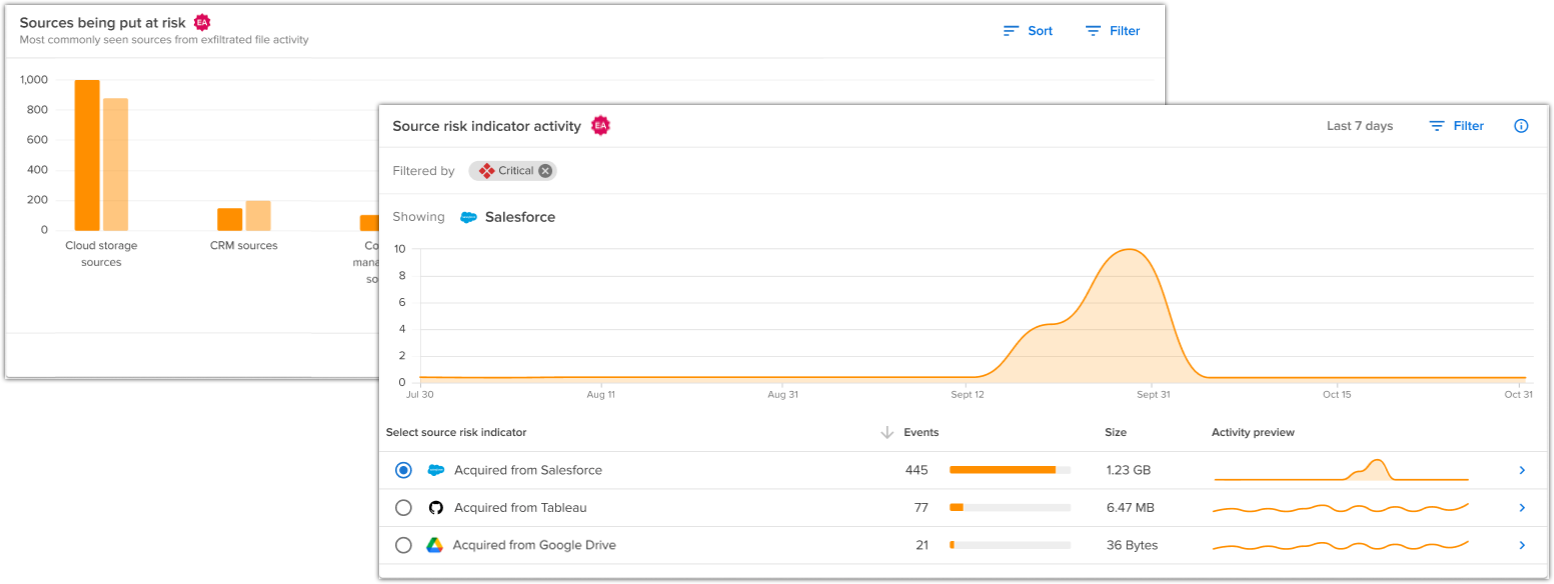 New "File acquired from" details highlight the source of a file
September 15, 2022
Early access
File events now include detailed metadata about the source of a file. Source information preserves the context of where the user acquired the file, which helps you evaluate risk in future file events.
For example, if a file is downloaded to an endpoint from an HR source (such as ADP or Workday), future file events for that file show you the HR source the file was initially acquired from. In addition, exfiltration events apply new Source risk indicators based on the source.
Source information is visible throughout Incydr, including Forensic search, Risk settings, Alerts, User lists, and Watchlists.
Enhancements and updates
September 23, 2022
- Added the ability to manually create an individual user from the Users list screen. Previously, you could only manually add individual users from the Organization details screen (Incydr Professional. Enterprise, Horizon and Gov F2 only).
- Added an Unmatched cloud usernames lab to show cloud storage usernames that are not associated with a Code42 user. Use this information to match corporate cloud storage usernames with Code42 users. This allows you to see a user's cloud and endpoint file events attributed to the same Code42 user in Incydr.
- General performance and stability improvements.
- Improvements to archive maintenance.
- Security updates.
- Removed the
/api/AuthToken/API for use in cloud storage. For details, see the Code42 API release notes.
September 22, 2022
- Added summary information to the Risk Exposure dashboard showing the number of open alerts, users with critical events, users leaving your company today, and open cases you have for your organization during the selected time frame.
-
Deprecated Legal Hold APIs that do not support pagination. For details, see the Code42 API release notes.
September 21, 2022
- Managing multiple watchlists is easier now with a new watchlist homepage and an overview of watchlist settings.
- Added event types to the Audit Log to record actions for managing trusted activity with Git repositories:
- Git repository added
- Git repository changed
- Git repository removed
September 20, 2022
- For data connections, removed "inventory in progress" from status labels and details statistics. When a cloud storage data connection is first authorized, it automatically starts monitoring your cloud storage environment for file activity and simultaneously completes an inventory of the environment's drives and files. This inventory process does not impact or hinder the detection of ongoing activity. By removing inventory statistics and the related status, the data connection more clearly describes its health in monitoring for any ongoing activity that increases your risk exposure.
September 14, 2022
- Version 3.0 of the Code42 app for Cortex XSOAR is now available. This update includes:
- API client authentication. To continue ingesting data, update your instance configuration to use an API client.
- Watchlist support
- Updated alerts filtering by risk severity
- Improved handling of file event information when fetching alert details
- Updated Code42 Incydr logo
September 13, 2022
- On the Organizations list screen, the agents column header is now labeled Insider risk agents (Incydr Professional, Enterprise, Horizon, and Gov F2 only).
- Security updates.
September 9, 2022
- Added support for API clients in py42. For details, see the Code42 API release notes.
September 8, 2022
- Now excluding certain temporary files and system files from backups. On a quarterly basis, Code42 reevaluates and adjusts exclusions to ensure that unnecessary files are excluded from backups. To see the full list of file exclusions, as well as additional global exclusions you can set, see Files excluded from backup by default.
September 7, 2022
- Added new User APIs to the Code42 Developer Portal to perform the following tasks. For details, see the Code42 API release notes:
- Get the roles associated with a user
- Update the roles associated a user
- Activate a user
- Deactivate a user
- Move a user to a specified organization
September 1, 2022
- Renamed the Temporary access button in the event details to View file. The button's functionality is unchanged: it requests temporary view access to shared cloud storage files so that you can open and view them.
- Removed the Audit (Premium) license requirement from the Microsoft Office 365 email data connection. Code42 can now monitor all email attachments where the only requirement is that senders have a Microsoft Exchange Online mailbox.
Bug fixes
September 23, 2022
- Resolves an issue where an "Error saving organization" message incorrectly appeared when saving changes to an organization. The changes saved, the message was a display issue only.
September 14, 2022
- Fixed an issue where Windows devices using the User State Migration Tool (USMT) failed to apply settings during device replacement.
September 13, 2022
- Fixed an issue where the Microsoft Office 365 license count on the License Plan screen inaccurately displayed 0.
Known issues
- In the Code42 console, the Activity tab of a legal hold matter does not load the timeline of legal hold events. However, events are still searchable via the Code42 CLI.
August 2022
Features
Send Instructor lessons directly to users in Incydr
August 22, 2022
You can now send Instructor lessons directly to users from Incydr. Instructor's situational and responsive lessons help reinforce your security awareness and training programs by providing engaging, targeted training that addresses topics relevant to an employee's tenure and provides best practices for avoiding security risks.
Use the Actions menu when it appears in alerts, user profiles, and user activity to email video lessons to users based on changes in their role or in response to risky activity.
Build custom visualizations with Incydr Labs
August 19, 2022
Incydr Labs is now available for testing out new, experimental reporting options. Within Labs, Chart Builder and Risk Combinations are available for visualizing Forensic Search query data. To access these visualizations, click the Labs icon from the top navigation menu.
Code42 integration for Tines
August 19, 2022
The Code42 integration for Tines is now available. The integration with Tines allows you to incorporate alerts and cases from Code42 into Tines security workflows.
Better identify exfiltration in cloud sync folders
August 15, 2022
File events in cloud sync folders now indicate if the file was uploaded to a cloud service from the device, or downloaded from a cloud service to the device. Previously, it could be difficult to determine the difference between upload and download activity, resulting in a higher volume of file events to investigate for risk.
- Uploads continue to be evaluated for trust and risk according to your trusted activity and risk settings.
- Downloads are automatically categorized as trusted activity because the file is not being exfiltrated from the device. Trusted activity does not appear in dashboards, user profiles, and alerts, but is still captured and searchable in Forensic Search.
In addition, you can use Source category, Source name, Destination category, and Destination name file event metadata to identify which direction the file moved.
- For uploads, the source fields report details about the device, and the destination fields report details about the cloud service. This may indicate greater risk.
- For downloads, the source fields report details about the cloud service, and the destination fields report details about the device. This is generally lower risk.
- Use the new Source user, Source account name, and Source account type fields along with the existing destination equivalents to determine if the activity occurred in a corporate or personal cloud account.
Incydr Professional, Enterprise, Horizon, and Gov F2 only
Code42 integration for Nullafi
August 10, 2022
The Code42 integration for Nullafi is now available. The integration with Nullafi allows you to restrict access to sensitive data in your enterprise based on Code42-identified parameters, such as risk severity level or watchlist membership.
Enhancements and updates
August 31, 2022
- Greatly improved performance when exporting a large list of devices to a CSV file.
- Performance and stability improvements.
- Security updates.
- Removed support for the
v3_user_tokenscheme. For details, see the Code42 API release notes.
August 30, 2022
- The First use of destination and Rare use of destination risk indicators now apply to removable media activity. Previously, they only applied to browser upload activity. Highlighting anomalous behavior on removable media destinations helps you better identify and prioritize risk.
- File event metadata for activity on removable media now reports the Destination category as Device and Destination name as Removable media. Previously, these destination fields only applied to browser upload and AirDrop activity.
August 19, 2022
- File event details now give you the choice to Copy event ID or Copy link to event details. Previously, it was only possible to copy the complete link, and there was not an easy way to copy the string value of the Event ID itself.
August 11, 2022
- Added many new options to the Destination settings in the Alerts rule builder. These correspond to the expanded destination risk indicators to notify you when matching activity occurs on these destinations.
August 4, 2022
- You can now set a custom date range on the Risk Exposure dashboard, Watchlists, User Profile, and All Users list. Previously, you could only select pre-set date ranges.
- Added more details to the Vectors for untrusted activity panel on the Insider Risk Trends dashboard.
- Click a category name (or its graph) to view details about the specific vectors in that category that have untrusted activity.
- After drilling down, click Back to return to the top-level category view.
August 3, 2022
- The Organizations screen now includes an Agents column with the number of devices in each organization. Click the value in the Agents column to view the list of devices. (Incydr Professional, Enterprise, Horizon, and Gov F2 only.)
- On the License Plan screen, endpoint licenses now reflect the number of backup licenses or file event monitoring licenses (whichever is greater). Previously, backup licenses and file event monitoring licenses were listed separately. (Incydr Basic, Advanced, and Gov F1 only.)
- The initial inventory of files in Box, Google Drive, and OneDrive that occurs upon enabling a cloud storage data connection now generates file events with an Event action of Inventoried. Previously, these file events were reported with the Event action of Created.
August 1, 2022
- Added Department and Watchlist filters to the activity over time tiles on the Risk Exposure dashboard to help assess risk across specific user groups. Previously, you could only filter by Event severity and Risk indicator.
- Added an API to the Code42 Developer Portal to export some or all components of a case. For details, see the Code42 API release notes.
Bug fixes
August 31, 2022
Fixed issues where:
- Using the replace device wizard for a Windows device with a USMT profile backup could fail with the message "Unknown error has occurred."
- Some administrators could not restore files from the Code42 console.
- In rare cases, files could not be restored from a device that was deactivated and then later reactivated.
- Some administrators could not view the list of active organizations.
- In rare cases, navigating to Administration > Environment > Devices could redirect an administrator to the Code42 console sign-in screen.
August 15, 2022
- For Gmail and Office 365 email file events, fixed an issue where attached files were not available for download in some circumstances.
- Fixed an issue where the list of legal hold matters or custodians did not sort consistently upon clicking a column header. Now matters and custodians are shown in descending chronological order without any additional sorting available.
August 2, 2022
- Improved performance for devices with intermittent network connections attempting to download an upgrade to the latest Code42 app version.
- Fixed an issue where changes to Code42 console settings were not saved under certain circumstances.
July 2022
Features
Apply trust to specific Dropbox accounts
July 19, 2022
Trusted activity settings now enable you to trust only specific Dropbox accounts. Trusting specific accounts helps you better identify risk in personal Dropbox accounts you don't control. For example, trusting your corporate Dropbox account prevents that file activity from appearing in security event dashboards, user profiles, and alerts. File activity in other Dropbox accounts, however, remains untrusted and is identified as a greater risk.
Requires Code42 app version 1.6.0 or later for Incydr Professional, Enterprise, Gov F2, and Horizon product plans, and version 10.3.0 or later for Incydr Basic, Advanced, and Gov F1 product plans.
Create custom watchlists to fit your needs
July 11, 2022
You can now create custom watchlists to monitor users you're most concerned about. Add a custom title and description, and tailor corresponding alerts to monitor the users that matter to you. Previously, you could only create recommended watchlists and adjust them to fit your needs.
Request temporary access to view cloud storage data connection files
July 7, 2022
Security analysts can now request temporary access to view files stored in your corporate Box, Google Drive, or OneDrive environments. By viewing file contents, you can better assess the risk to your business data when those files are shared with untrusted external users. (Previously, analysts could only view Box, Google Drive, or OneDrive files if they were included in those files' sharing permissions.)
To request access to view files, click Temporary access when it appears under Filename in the file event details. Temporary access expires after 15 minutes.
Temporary access requests create these entries in the Audit Log:
- Temporary file access granted
- Temporary file access revoked
Enhancements and updates
July 21, 2022
- Added organization APIs to the Code42 Developer Portal to perform the following actions. For details, see the Code42 API release notes.
- Get a list of organizations
- Create an organization
- Get a specific organization
- Update a specific organization
- Activate a specific organization
- Deactivate a specific organization
July 20, 2022
- The
agent.commandcommand in the Code42 console command-line interface (CLI) now supports sending CLI commands to Incydr Basic, Advanced, and Gov F1 clients, even if the device is offline. (This command is already supported for Incydr Professional, Enterprise, Gov F2, and Horizon product plans.) - Performance and stability improvements.
- Security updates.
July 18, 2022
- Added Departments and Directory Groups APIs in the Code42 Developer Portal to support building integrations with watchlists. For details, see the Code42 API release notes.
July 14, 2022
- Exporting a case now includes the option to include all file contents.
July 11, 2022
- Added many new destination risk indicators for files uploaded via a web browser. The new risk indicators help you better identify risk by listing the specific upload destination, which greatly reduces the number of file events listed as Other uploads. You can also customize the risk score for each new destination to match your specific risk tolerance.
To see a complete list of all risk indicators, sign in to the Code42 console and select Risk Settings, then select a destination category to view individual destinations and risk scores.
July 8, 2022
- Improved the experience for viewing and editing risk indicators. The refreshed Risk settings interface includes additional categories, which makes it easier to find and edit individual risk indicators.
July 7, 2022
- Added a Resource ID field to the Audit Log filter to search for events related to a specific resource's ID. Resources whose IDs you can search for include:
- Affected user
- Alert
- Alert rule
- Archive source compute GUID
- Case
- Client
- Federation
- Identity provider
- Provisioner
- User
- Watchlist
Bug fixes
July 20, 2022
- Greatly improved performance when exporting a large list of users to a CSV file.
- Fixed a very rare issue where archive maintenance did not complete, which caused back up and restore to be unavailable.
- Fixed an issue where the list of Trusted activity entries did not sort correctly upon clicking a column header.
Known issues
July 20, 2022
- When performing a zip file restore from the Code42 console, selecting files from multiple backup sets only restores the files in the default backup set. To restore from multiple backup sets, select a specific backup set from the restore dialog, then select the files to restore from that backup set. Repeat this process for each backup set.
June 2022
Features
File event metadata changes
June 13, 2022
Improvements to the file event details data model provide a better focus on insider risk indicators. Changes affect both the Code42 console and Code42 API, though most changes are minor and do not require you to take any action. Changes include:
- Reorganized file event details display order to better highlight insider risk indicators.
- Addition of several new fields to better focus on details of a specific event.
- Removal of outdated, duplicate, and ambiguous/extraneous fields.
- A new
/v2/file-eventsCode42 API endpoint, which moved from a flat model to a hierarchical structure with parent objects for each field. - Improved clarity on source and destination fields.
For complete details, see File event metadata changes.
Populate watchlists using directory groups and departments
June 8, 2022
You can now populate watchlists via your directory groups and departments from your identity management provider. This allows you to automatically control who is on or off a watchlist depending on their directory groups or departments membership.
Enhancements and updates
June 29, 2022
- The Risk Exposure dashboard, Watchlists, User Profile, and All Users list now include the option to view the past 3 days of data (in addition to the existing time filters of 24 hours, 7 days, 30 days, and 90 days).
June 28, 2022
- File event details now include 100s of individual source and destination values in over 35 different categories. These new destination and source category labels help you better identify risk by greatly reducing the number of file events listed as Uncategorized.
June 27, 2022
- The User Profile now shows the current and past cases associated with a user.
June 22, 2022
- Performance and stability improvements.
- Security updates.
- Removed support for Windows 10 version 2004 and Windows 10 version 1909. Devices using these versions will no longer upgrade to newer versions of the Code42 app.
June 21, 2022
- The Destination account name and Destination account type fields are now displayed in the file event details and are available as filters in Forensic Search. For cloud sync apps installed on user devices, these fields can help you better identify risk by indicating if the activity occurred in your corporate cloud account, or in a personal account you don't control.
- The
v2/file-eventsAPI added new fields:-
event.inserted: Indicates the date and time the event was received for indexing by Code42. This may differ slightly from the existing@timestampfield, which indicates the date and time the event was initially observed. -
destination.domains: The domain section of the URLs reported indestination.tabs.url. -
source.domains: The domain section of the URLs reported insource.tabs.url. (Note: Although similar in name, this field has no relation tosource.domain, which reports the FQDN or IP address of the user’s device.)
-
June 13, 2022
- File event details now display the Event ID and include a clickable icon to copy a link to these event details to your clipboard. This link enables you to easily share specific events with others (who have the required permissions to access Forensic Search), or to save the URL for your own future reference.
June 8, 2022
- Added event types to the Audit Log to record changes to watchlists:
- Department added to watchlist definition
- Department removed from watchlist definition
- Excluded users added to watchlist definition
- Excluded users removed from watchlist definition
- Groups added to watchlist definition
- Groups removed from watchlist definition
- Included users added to watchlist definition
- Included users removed from watchlist definition
June 6, 2022
- In the Forensic Search CSV export, the column headings Email DLP Subject, Email DLP Recipients, Email DLP Sender, and Email DLP From changed to Email Subject, Email Recipients, Email Sender, and Email From. (DLP integration was deprecated in September, 2021.) If you use customized scripts to parse this CSV export, you may need to update them to account for the new column names.
Bug fixes
June 22, 2022
- Fixed an issue where the Windows Code42 app did not upgrade to the newest version in some Amazon WorkSpaces instances.
- Fixed a rare issue where searching from the Restore files screen in the Code42 app did not return any results.
June 16, 2022
- Fixed an issue introduced to Forensic Search results on June 13th where the Source name and Destination name fields did not display the device's hostname as expected.
May 2022
Features
Apply trust to specific OneDrive accounts
May 19, 2022
- Trusted activity settings now enable you to trust only specific OneDrive accounts. Trusting specific accounts helps you better identify risk in personal OneDrive accounts you don't control. For example, trusting your corporate OneDrive account prevents that file activity from appearing in security event dashboards, user profiles, and alerts. File activity in other OneDrive accounts, however, remains untrusted and is identified as a greater risk.
Enhancements and updates
May 25, 2022
- The Code42 console sign-in screen and navigation menu are updated to feature the Code42 Incydr logo.
- A new Vectors for untrusted activity panel has been added to the Insider Risk Trends dashboard. This panel shows the vectors by which the most untrusted activity commonly occurs, organized by destination type. When combined with the other panels on the dashboard, this information can help fine-tune your trusted activity settings to better identify risky activity.
May 20, 2022
Added a new version (v2) of File Events APIs and deprecated the previous version (v1). For details, see the Code42 API release notes.
May 19, 2022
- The Destination risk indicator activity over time and the File categories graphs on the Risk Exposure dashboard and User Profile now show file activity by the destination and file risk indicators. Previously, the activity was grouped into broader destination and file categories. Increase the risk score of destinations or files you're most concerned about to ensure those events are prioritized and more visible on the dashboards and User Profile.
- Added event types to the Audit Log to record changes to account names in trusted activity:
- Account name added
- Account name changed
- Account name deleted
- Added support for watchlists in the Code42 command line interface.
May 18, 2022
- Changed the expiration period for deployment secrets from six months to one year.
- Added the ability to grant API client write access to the Org endpoint. Write access enables the API client to perform actions such as blocking, unblocking, deactivating, and reactivating an organization.
- In the Code42 API, removed the
email_promoparameter from theUserendpoint, as it was no longer in use. - Deprecated outdated APIs to improve security and enforce the principle of least privilege. If you have Code42 API scripts that use the deprecated APIs, update them to use the new APIs before the end-of-life date one year from deprecation. For more information about the API deprecations, see Code42 API release notes:
- Deprecated
UserBlock,UserDeactivation,UserRole, andUserMoveProcessAPIs. - Deprecated
Org,OrgBlock, andOrgDeactivationAPIs.
- Deprecated
May 12, 2022
- Added support for watchlists in py42.
May 5, 2022
- From the user activity details in the Risk Exposure dashboard, All Users list, Watchlists, and User Profile, you can now view all file event metadata without navigating away to Forensic Search. Click the
icon next to an event to quickly assess risk and even view the file contents all without leaving the context of your investigation.
May 2, 2022
- For users who sign in to the US2 cloud, updated the Code42 console sign-in screen with links to sign in to other Code42 products.
Bug fixes
May 18, 2022
- Performance and stability improvements.
- Fixed an issue where a legal hold preservation policy with no file selection defined did not collect files as expected in some situations (though files were still available via the backup archive). Now, the preservation policy collects files according to the backup file selection of the custodian's organization if no file selection is defined.
- Fixed an issue where users with the Security Administrator role were not able to access the File Event Exclusions settings in the Code42 console as expected.
- On Macs, fixed an issue where files could not be restored to the "original location" if the source backup device and target restore device had different processor types. Now, restoring to the original location between devices with M1 and Intel processors works as expected.
- Fixed a rare issue where attempting to restore files from the Code42 console could fail with the message "Status: Error calculating totals. Try it again."
- Fixed a rare issue where users could not sign in to the Code42 app via Shibboleth single sign-on (SSO).
- Using the Code42 API to add security event and backup exclusions for Windows devices now automatically converts backslashes (\) in file paths to forward slashes (/). This fixes an issue where some exclusions were not applied properly.
- Fixed an issue where the Off hours risk indicator was not visible in some circumstances.
- For environments using single sign-on (SSO) authentication, fixed a rare issue where the Code42 app could repeatedly open prompts in a web browser to sign in to SSO.
April 2022
March 2022
Features
Discover trends with the Insider Risk Trends dashboard
March 28, 2022
The Insider Risk Trends dashboard shows how your organization's risk profile changes over time. Whether you're just starting to develop an insider risk program or already have a robust program in place, this dashboard helps identify where to focus controls, training, and engagement to improve risk. To view it, select Insider Risk Trends from the new Dashboards menu.
The dashboard tracks fluctuations in these metrics:
- The number of users causing critical or high severity file events
- The departments in your organization that cause the most untrusted events
- The types of files involved in exfiltration events
Enhancements and updates
March 31, 2022
- Improved capture and retention of file contents within Cases. File contents are now collected in more situations and are retained for the duration of the investigation for all Incydr product plans. (Previously, Incydr Basic, Advanced, and Gov F1 required the file to be included in the backup file selection, and Incydr Professional, Enterprise, Horizon, and Gov F2 retained file contents according to the data retention policy for your product plan).
March 29, 2022
- Added event types to the Audit Log to record changes to alert rules and alerts:
- Alert note edited
- Alert rule created
- Alert rule deleted
- Alert rule disabled
- Alert rule edited
- Alert rule enabled
- Alert state changed
- All users removed from alert rule
- Users added to alert rule
- Users removed from alert rule
- Watchlist removed from alert rule
March 28, 2022
- To help you focus on legitimate exfiltration events, the Code42 Salesforce data connection no longer collects information about reports exported from your environment by third-party applications and no longer displays those events in Forensic Search. The data connection continues to monitor for any reports that are downloaded from Salesforce to either corporate or personal endpoints.
March 21, 2022
- Alerts adds corporate email destinations to the alert rule builder to notify you when files are sent as attachments to untrusted recipients. These alerts help you respond quickly when vital business data is emailed to external recipients from your organization's email service.
March 16, 2022
- Security updates.
- Devices using unsupported macOS 10.14 Mojave will not upgrade to newer versions of the Code42 app.
March 4, 2022
- Starting March 31, 2022, alert notifications that are older than your product plan's retention period are removed from the Review Alerts list and are unavailable. To save any alert notifications prior to the end of the retention period, use the Code42 API to export alert notification details to an external file or your security information and event management (SIEM) tool. See th Code42 Developer's Portal for more information on the Code42 API.
- Improved additional event details for the File download event type in the Audit Log:
- Added the File name field
- Renamed File name in storage to File path
- Renamed File size in archive to File size
March 2, 2022
- Older Google Drive files that inherited the deprecated "Public on the web" sharing permission are now identified as "Public via direct link" for the File exposure changed to and Exposure type fields in Forensic Search. Google deprecated its "Public on the web" sharing permission in April 2020 to increase security, and this change makes Forensic Search's identification of sharing activity for publicly available files consistent across all cloud service vendors.
Bug fixes
March 30, 2022
- For devices backing up to new storage destinations as part of recent changes to Code42 cloud infrastructure, fixed several issues, including:
- Backups did not complete under certain circumstances.
- Devices with a backup alert for no recent activity could remain in an alert state even after backup activity resumed.
- Other performance and stability improvements.
- Security updates.
March 16, 2022
- On the Administration > Environment > Devices > Backup Alerts screen, fixed an issue where clicking a column heading to sort results did not work correctly.
- Fixed a very rare issue where moving a user to a different organization could cause backup archives in cold storage for that user to use the retention period of the original organization. Now, archives in cold storage correctly use the retention period of the user's current organization.
- Fixed an issue affecting Incydr Basic and Advanced product plans where changes to file event exclusions were not applied until after the Code42 service or the device restarted. Now, changes to exclusions are applied immediately.
- Fixed a rare issue where a deployment policy could redirect user devices to the wrong Code42 URL, which caused device registration to fail.
- Fixed an issue where removing permissions from an API client did not properly save the new permissions.
- Performance and stability improvements.
February 2022
Features
Monitor risky users with watchlists
February 26, 2022
Code42 introduces watchlists to help you more closely monitor employees that may have higher risk of exfiltration due to their current role or past behaviors.
Watchlists provide you with special views that help cut through the noise of all the file activity across your organization by focusing on the users you are the most concerned about. For any watchlist, you can build alerts that notify you when any users on your watchlist require your attention.
Previously, you could monitor departing and high-risk employees on our lenses. Those lenses have been replaced with more robust and varied watchlists including the New hire watchlist. If you were previously using lenses, we have recreated them for you in the new watchlists. For a full list of the types of watchlists you can create, see Manage watchlists.
Customize scope of trusted domains
February 16, 2022
Trusted domain settings now enable you to individually choose whether or not to trust different types of activity on a domain, including:
- Files uploaded to the domain via a web browser
- Files synced to cloud storage by desktop apps
- Files shared from cloud storage or email services monitored by Incydr
In addition, you can also fine tune trust settings within each category to better identify risk in unmonitored locations. For example, if your company's approved cloud storage solution is OneDrive, now you can choose to not trust activity in other cloud storage services, even when the username accessing those services is on a trusted domain.
Previously, adding a trusted domain trusted all activity on that domain.
Respond to insider risks within the Code42 console
February 9, 2022
A new Actions option is available in the Code42 console for manually running Incydr Flows. This option enables you to choose how to respond to insider risks using third-party tools, based on your investigation in Incydr. The Actions menu is available from the User Profile and when you investigate a user's activity. Work with Code42 Professional Services to set up Incydr Flows to appear as options from the Actions menu.
New Insider Risk Respond role
February 9, 2022
A new Insider Risk Respond role provides granular permissions that allow an individual to use the Actions menu to respond to insider risk events. This role is intended to augment the Insider Risk Analyst role.
Enhancements and updates
February 28, 2022
- Improved detection of Microsoft Office 365 email users that have Advanced Audit turned on. This may cause more users to be monitored by the Microsoft Office 365 email data connection.
- To support building integrations with watchlists, added Watchlists APIs and deprecated Detection Lists APIs.
February 26, 2022
- Added event types to the Audit Log to record changes to watchlists:
- Risk profile end date changed
- Risk profile start date change
- User added to watchlist membership
- User removed from watchlist membership
- Watchlist created
- Watchlist definition changed
- Watchlist deleted
- Watchlist name changed
February 17, 2022
- Adds operating system icons to the Devices screen (Incydr Professional, Enterprise, and Horizon product plans only).
February 16, 2022
- A new
purge.pathcommand in the Code42 console command line interface (CLI) enables you to remove specific files and paths from a backup archive. Removals are tracked in Audit Log with the event type Path purged. - In the Code42 API, removed the
lastLoginDateparameter from theUserresource.
February 9, 2022
- In Data Connections, adding a new connection now opens a panel that slides in from the right to maximize screen use and allow for future expansion.
February 2, 2022
- Added support for the Off hours risk indicator to the Incydr Enterprise, Horizon, and Gov F2 product plans.
- Released Code42 User Directory Sync version 1.6.4. For details, see the Code42 User Directory Sync release notes.
Bug fixes
February 16, 2022
- Performance and stability improvements.
- Fixed an issue where the Code42 app replace device wizard could fail to transfer settings to the new device.
- Fixed a rare issue where trying to view a user's details or get files from a legal hold in the Code42 console resulted in an error.
- Fixed an issue where using an API client to retrieve device information resulted in an unexpected 403 error in some situations.
- File event exclusions entered into the Code42 console now only accept a backslash (\) as a Windows path separator. This fixes an issue where paths entered with a forward slash (for example, C:/) were not properly excluded.
January 2022
Previous release notes
For release notes prior to January 2022, see Previous version release notes.
Comments
Please sign in to leave a comment.